For Grok Imagine creators

Your Grok history is not your archive.

Grok Imagine can be a creative roller coaster. The highs are extraordinary. The lows can make the work—and the platform beneath it—feel suddenly fragile. GenCatalog gives every image, video, prompt, reference, and half-forgotten idea a permanent home on your computer.

Mac + Windows  ·  7-day free trial  ·  Works with the GenCatalog Chrome extension

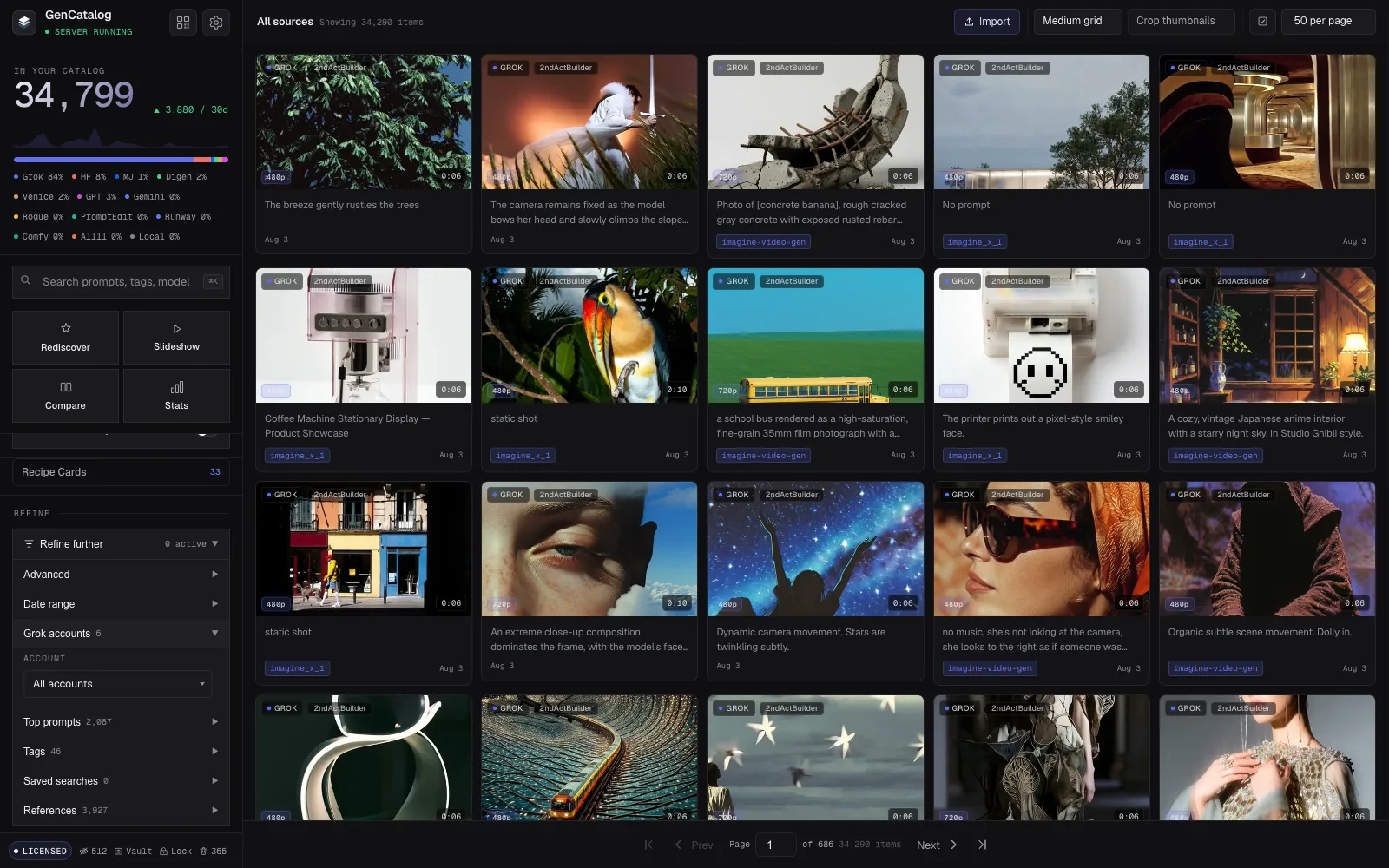
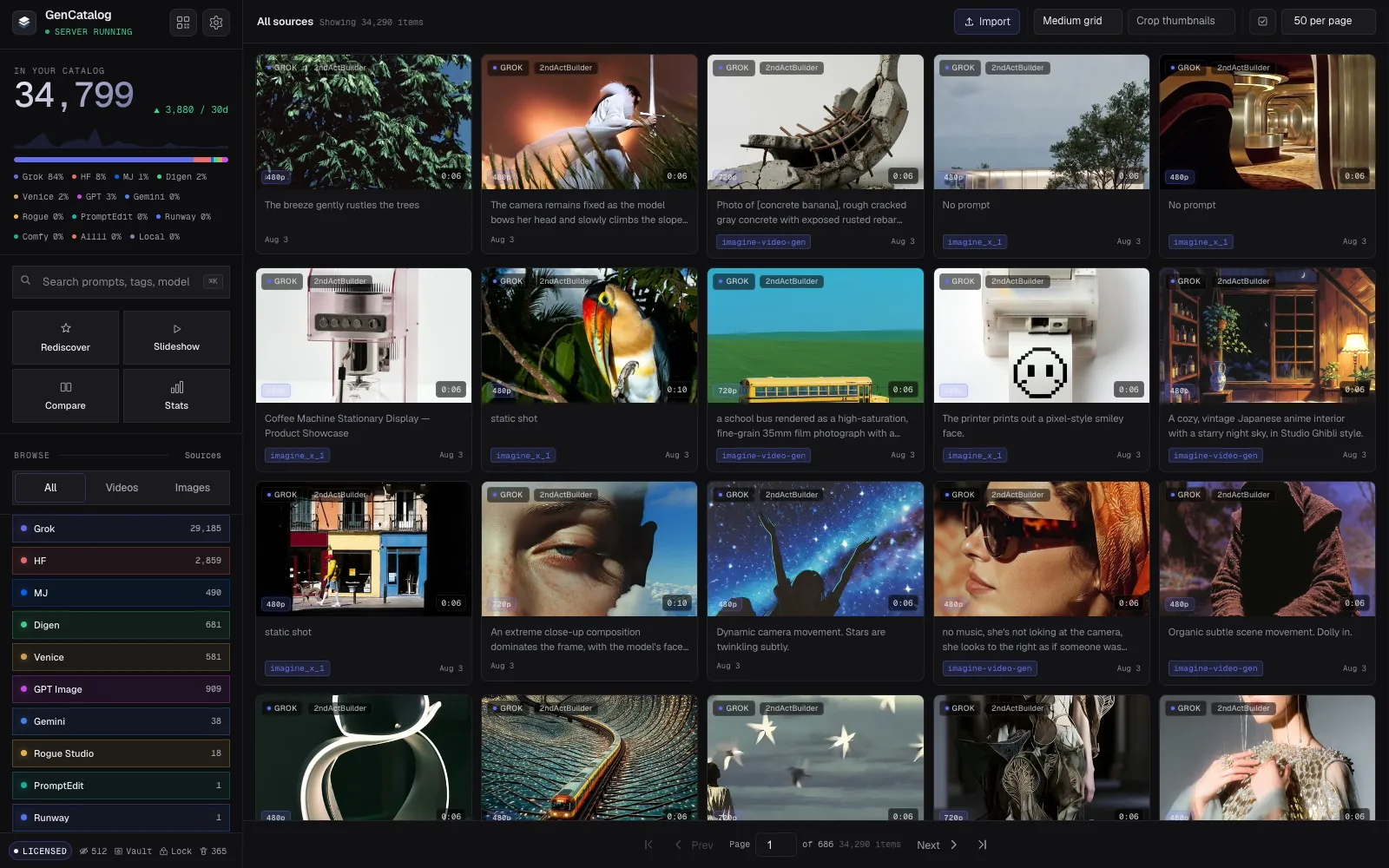
The current GenCatalog app showing a public-safe Grok Imagine library with search, source filters, quality badges, account labels, and nearly 35,000 catalog items
The current GenCatalog app with newly saved public Grok work34,799 generations
The files are only the beginning.Prompts, accounts, relationships, dates, notes, and the path back to the idea stay with them.
Creative ownership

History is what a platform lets you see. An archive is what you actually own.

I built GenCatalog after realizing that almost everything I had made in Grok existed only because Grok still chose to host it.

Interfaces change. Features move. Policies tighten and relax. The recent moderation changes are one more reminder that a platform and its boundaries can change long before your ideas do. That does not make Grok uniquely bad. It makes Grok a platform—and hosted history isn’t an archive.

Not a museum

Your old prompts can become more useful as the models change.

An image that missed nine months ago may point somewhere remarkable in a newer model. A reference you forgot can begin a new branch. Your archive is not just a record of what you made. It is future creative leverage.

Preserve the attemptKeep the prompt, result, reference, motion prompt, and source context together.
Rediscover the ideaSearch thousands of generations without relying on memory, scrolling, or filenames.
Return when the moment is rightReuse what you learned when Grok’s models and creative boundaries change again.
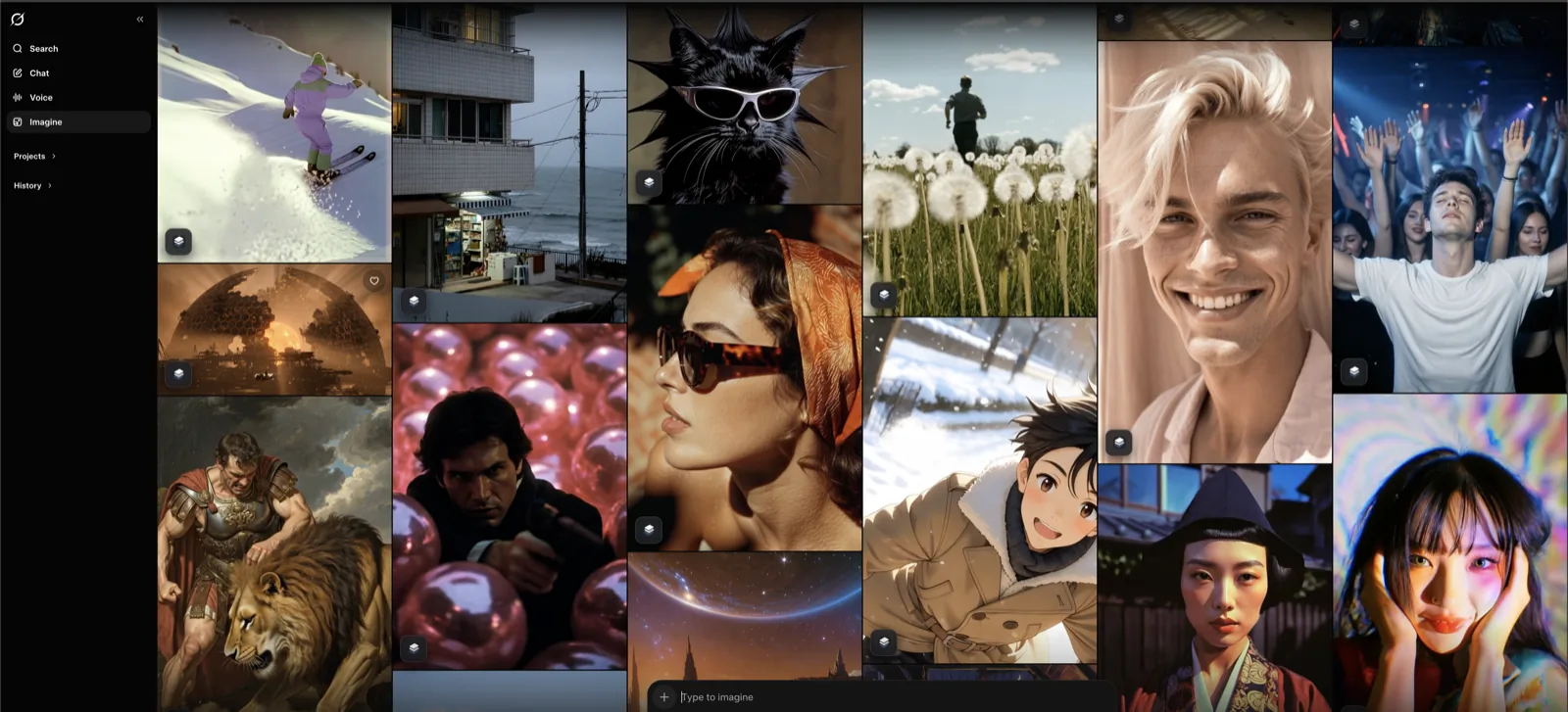
Grok Imagine generations with GenCatalog Save and Save plus Favorite controls
Save from Grok Imagine as you createSave · Save + Favorite
Preserve

Save the generation. Keep the reason it mattered.

Use the save controls inside Grok as you work, or bring an existing library across in bulk. GenCatalog keeps the media and the available creative context together instead of leaving you with an anonymous download.

  • One-click capture: save an image or video, with the option to favorite it locally at the same time.
  • Bulk library capture: scan existing Grok media, skip duplicates, and continue long jobs in the background.
  • Smart Sync: recognize what is already saved and focus on what is new.
  • Prompt safeguards: hold generated work when a prompt should be recoverable instead of silently filing an incomplete record.
  • Source scopes: choose all Grok media, Image + Agent Mode, or chat media only.
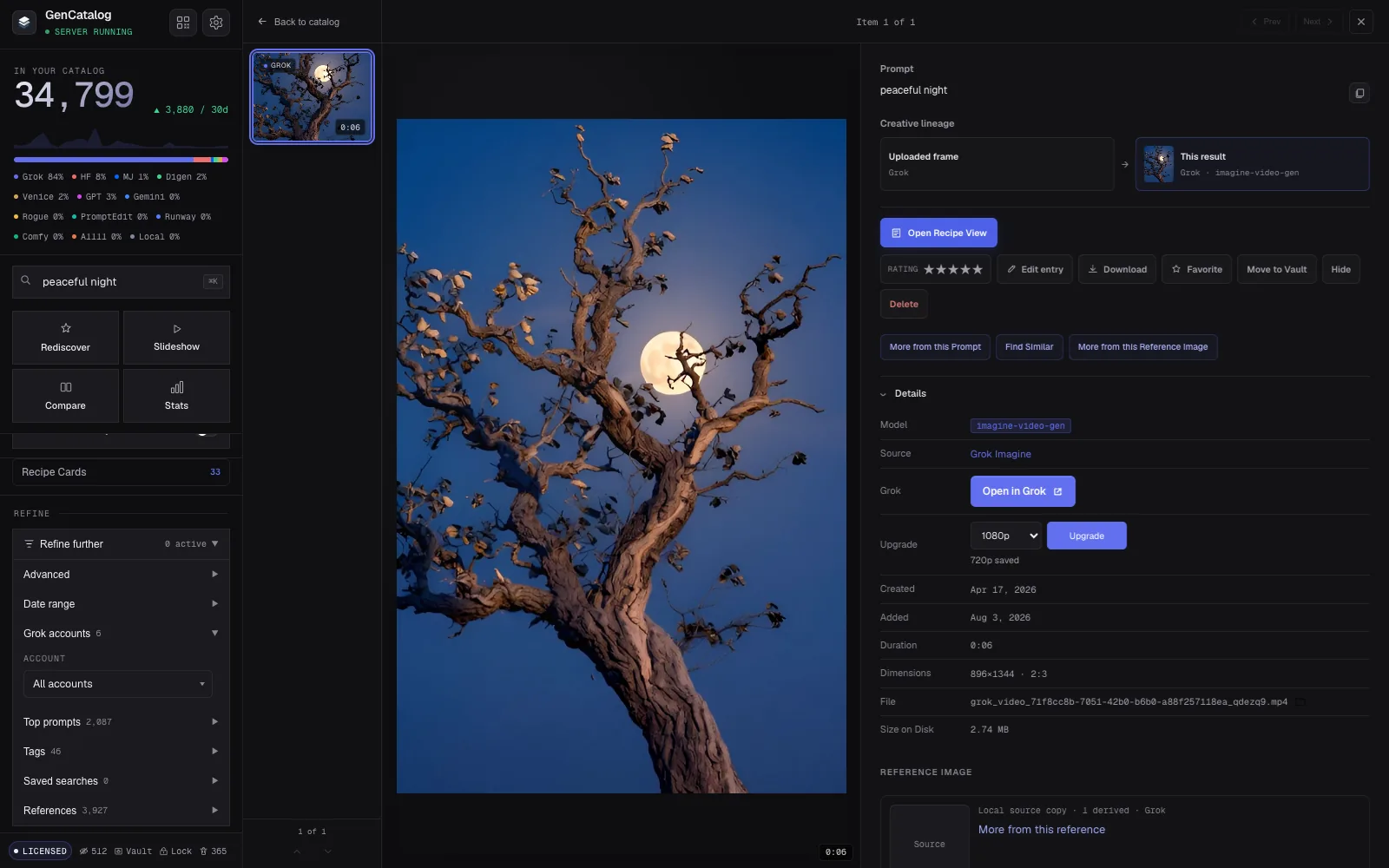
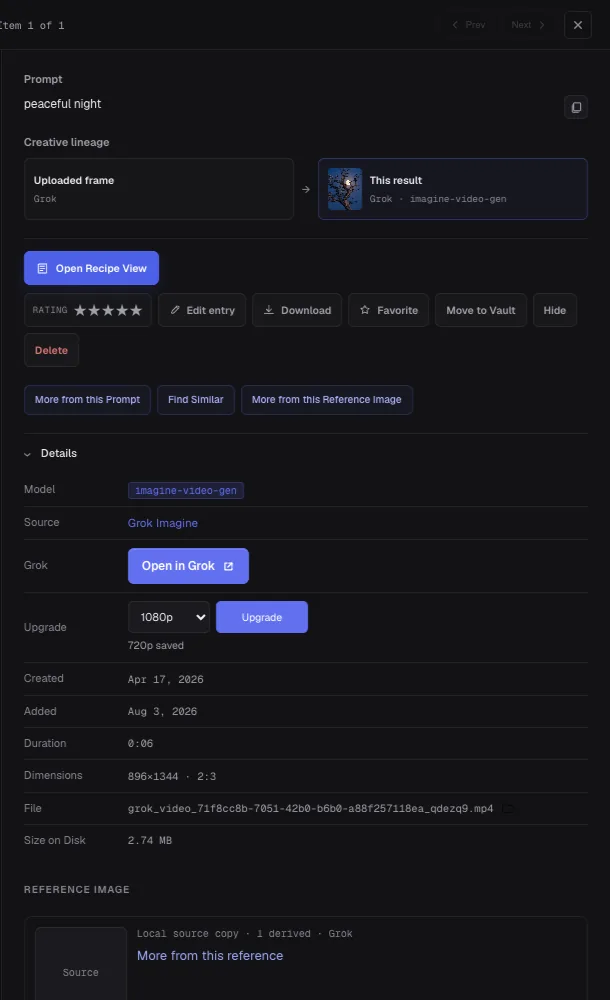
Current GenCatalog Grok detail view showing an uploaded frame, resulting video, local source copy, related-item discovery, Open in Grok, and a 1080p upgrade control for Grok Heavy subscribers
Current Grok detail view: lineage, local reference, discovery, and upgradeCaptured Aug 3, 2026
Understand

Every reference can become the root of a family tree.

A result is more useful when you can see where it came from. GenCatalog preserves source relationships so you can move through the images, edits, variations, and videos that grew from the same reference.

  • Reference lineage: browse the creative descendants of a source image instead of hunting for them one by one.
  • Exact reference copies: store the original local reference when Grok still makes it retrievable.
  • Historical repair: repair missing references account by account, with pause, resume, cancel, and clear status.
  • Generation Recipes: keep image prompts and motion prompts distinct across multi-stage work.
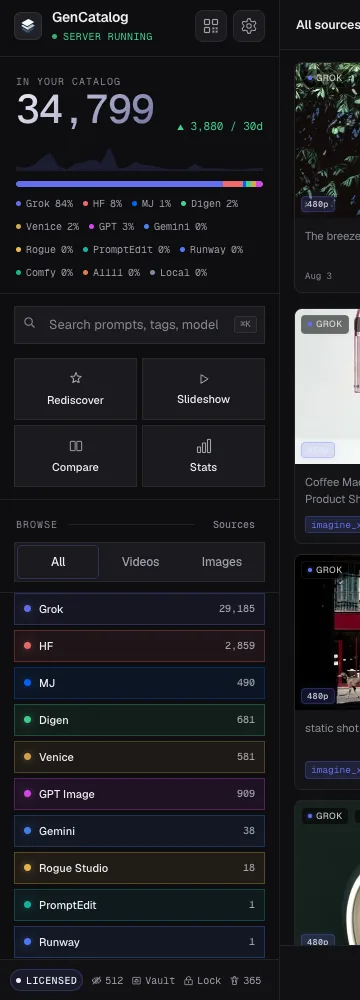
Current GenCatalog sidebar showing a nearly 35,000-item catalog, universal search, Rediscover, Slideshow, Compare, Stats, and source filters
Current search and discovery tools34,799 items
Find

The generation you forgot is often the one worth finding.

Search prompt text, accounts, sources, models, filenames, notes, and tags from one field. Then narrow the result without losing your place—or let Rediscover surface work you had stopped thinking about.

  • Universal search: prompt, tag, model, source, account, filename, and notes.
  • Deep filters: media type, date, rating, favorite, notes, prompt, reference, tags, and upgradeability.
  • Saved searches: return to a useful slice of the library in one click.
  • Top prompts: browse the language you use most, most recently, or alphabetically.
  • Rediscover, slideshow, and stats: see the archive as a creative body of work, not a directory.
Current GenCatalog library with the Grok accounts refinement open, showing six source accounts inside one catalog
One current catalog, six Grok accountsAccount-aware filters
Multiple accounts

One library. Every Grok identity still intact.

Creators rarely stay inside one account forever. GenCatalog can place work from multiple Grok accounts in the same catalog without flattening away where it came from.

  • Automatic account labels: record the source account when Grok exposes it.
  • Composable filters: combine an account with source, media, tag, rating, date, prompt, or any other filter.
  • Account counts: understand how the library is distributed at a glance.
  • Correct-account workflows: repair references and request upgrades from the Grok identity that owns the work.
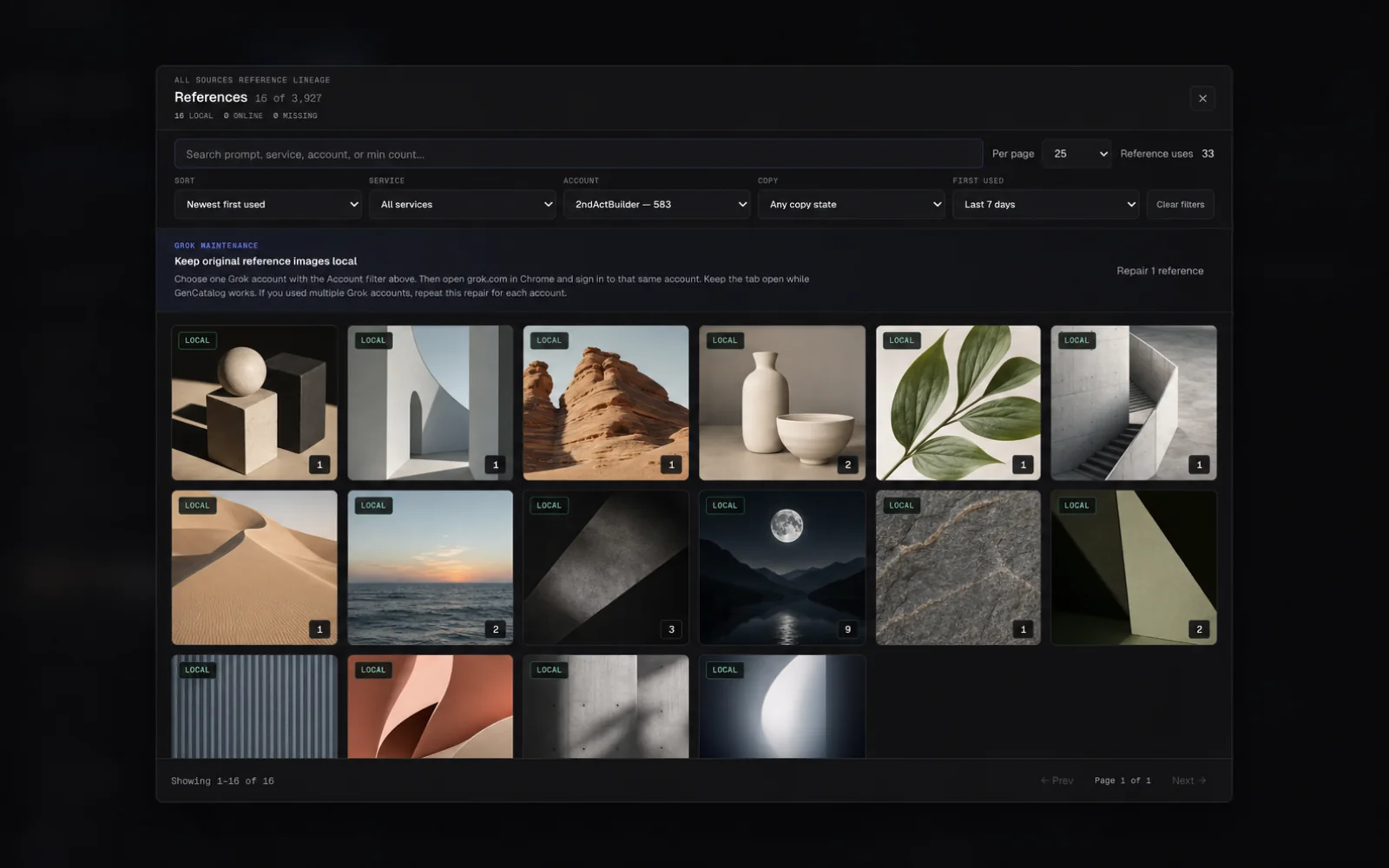
Current GenCatalog reference browser showing local, online, and missing reference states plus service, account, date, and copy-state filters with illustrative placeholder previews
Current reference browser with illustrative placeholdersLocal · Online · Missing
Repair

Keep the original references, not just the generations they produced.

GenCatalog shows which source images are already local, still online, or missing—and lets you work through historical Grok reference recovery in the account that owns them.

  • Reference inventory: search and sort sources by service, account, copy state, first use, and number of descendants.
  • Account-scoped repair: select one Grok account, open a matching signed-in tab, and recover what remains available.
  • Durable background jobs: pause, resume, or cancel without making the popup own the work.
  • Clear outcomes: distinguish a local source copy from an online-only or missing reference.
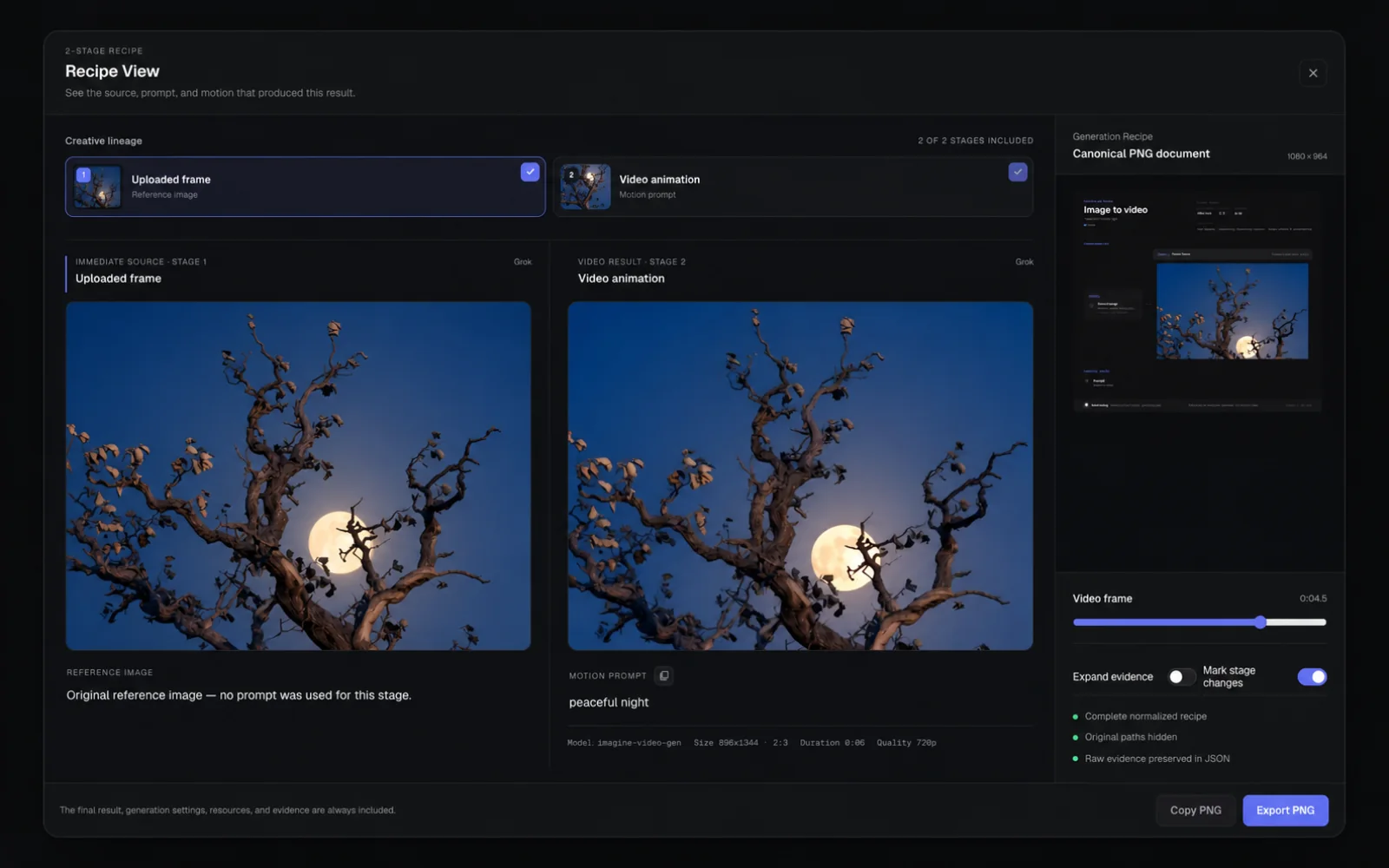
Current GenCatalog Recipe View for a Grok image-to-video generation, showing an illustrative source preview, motion prompt, result, canonical recipe document, and PNG export
Current Grok Recipe View with illustrative source previewSource · Motion · PNG
Reuse

Turn a finished image back into a working idea.

Recipe View reconstructs the creative trail behind a generation. Copy the prompt, study the stages, export the recipe, compare two approaches, or return to the original Grok record when its source link is available.

  • Recipe Cards: export a visual record that keeps the result and the prompt together.
  • PNG + JSON export: share the human-readable idea or preserve the structured recipe.
  • Recipe Compare: place two generations and prompts side by side to see what changed.
  • Original source links: open a saved item back in Grok when the link is available.

Shown in the current Recipe View with an illustrative source preview. More complex Grok lineages add the additional stages GenCatalog can recover from the source.

Current GenCatalog Grok detail controls showing the original prompt and lineage, Open in Grok, a 1080p upgrade selector for Grok Heavy subscribers, 720p saved status, original creation date, file details, and local reference state
Upgrade directly from the current detail view720p saved → 1080p with Grok Heavy
Upgrade

Upgrade Grok videos without leaving your library.

Find videos that Grok can upgrade and manage the work as a queue from inside GenCatalog. GenCatalog supports 720p upgrades; 1080p upgrades require a Grok Heavy subscription. Quality badges make the final state visible without opening every file.

  • Upgradeable video filter: isolate the work that is eligible.
  • Individual or bulk queue: upgrade one video or work through many.
  • Quality badges: see the stored resolution at a glance.
  • Account-aware guidance: get pointed to the correct Grok account when an upgrade needs it.
  • Original timeline preserved: the upgraded file stays anchored to when the work was first created.

Upgrade availability depends on what Grok supports for the source video and signed-in account. 1080p requires an active Grok Heavy subscription.

The preservation record

Everything GenCatalog can preserve from Grok.

This table separates information captured from Grok from organization you create inside GenCatalog. Platform-derived fields depend on what Grok exposes for a given generation and account.

InformationWhat GenCatalog doesAvailability
Generated image GROKSaves a local media copy and catalogs it beside its creative context.When Grok still exposes the media.
Generated video GROKSaves the video, duration, dimensions, lineage, and quality state when available.When Grok still exposes the video.
Image prompt GROKPreserves searchable prompt text; missing prompts can be held for recovery.When provided or recoverable from Grok.
Motion prompt GROKKeeps the video instruction separate from the image prompt.For supported image-to-video records.
Parent prompt GROKRetains the earlier prompt in a multi-stage creative chain.When Grok exposes the relationship.
Uploaded reference GROKStores an exact local copy and links its creative descendants.When the reference remains retrievable.
Reference lineage GROKConnects sources, generations, edits, variations, and video branches.When the source relationship is available.
Model + settings GROKRecords available model, quality, aspect, dimensions, and generation parameters.Fields vary by Grok surface and generation.
Creation date GROKPreserves the original creative timeline rather than only the download date.When source date information is available.
Grok account GROKLabels and filters work by the account that created or owns it.When Grok exposes account identity.
Folder, tag, or project GROKRetains available Grok-side organizational context.When present on the captured Grok surface.
Agent Mode context GROKPreserves available session, step, and source details with Agent Mode media.When exposed by Grok Agent Mode.
Original Grok link GROKKeeps a route back to the source record.When a stable source link is available.
Upgrade status GROKTracks eligibility, queued work, target quality, and completed quality badges.Where Grok supports video upgrades; 1080p requires Grok Heavy.
Tags + collections LOCALLets you build your own taxonomy across accounts and sources.Created and managed in GenCatalog.
Notes + ratings LOCALAdds the judgment and memory that a raw generation cannot carry alone.Created and managed in GenCatalog.
Favorites + hidden state LOCALKeeps important work close and sensitive or distracting work out of the main view.Created and managed in GenCatalog.
Generation Recipe LOCALAssembles available prompts, references, stages, and results into one reusable record.Built from the context available in the catalog.
The complete Grok toolkit

A serious library needs more than a download button.

Preserve

  • Save
  • Save + Favorite
  • Bulk Grok scan
  • Saved/Favorites capture
  • Imagine capture
  • Chat media capture
  • Agent Mode capture
  • Folder and project context
  • Smart Sync
  • Duplicate prevention
  • Deleted-item recognition
  • Prompt recovery
  • Held-item review
  • Removed-media recovery option
  • Pause and resume
  • Background large-library work
  • Uploaded-input exclusion
  • Bulk unfavorite or delete from Grok

Organize

  • Local tags
  • Collections
  • Collection pinning
  • Recent-media or A–Z collection sort
  • Collapsible collections
  • Targeted collection clearing
  • Notes
  • Star ratings
  • Favorites
  • Hidden Items
  • Private Vault
  • Trash and undo
  • Account labels
  • Grok folder context
  • Grok tag context
  • Grok project context
  • Local file import
  • Watched folders

Search and rediscover

  • Universal search
  • Prompt search
  • Account filters
  • Source filters
  • Media filters
  • Date filters
  • Rating filters
  • Reference filters
  • Upgradeable filter
  • Saved searches
  • Top prompts
  • First-added sort
  • GC-modified sort
  • Created-date sort
  • Rediscover
  • Actionable Rediscover details
  • Slideshow
  • Slideshow preparation progress
  • Favorite, rate, hide, Vault, or Trash in slideshow
  • Library statistics

Understand and reuse

  • Reference family trees
  • Source relationship repair
  • Local/online/missing source states
  • Reference-use counts
  • Generation Recipes
  • Recipe Cards
  • Removable Recipe Cards
  • Recipe Compare
  • Phrase-level prompt differences
  • Matching and one-sided fields
  • Cross-source and image/video compare
  • PNG recipe export
  • JSON recipe export
  • Separate motion prompts
  • Copy prompt
  • More from this prompt
  • Find Similar
  • More from this reference
  • Open original on Grok
  • Detail and fullscreen views
  • Batch export
  • Reveal in Finder or Explorer
  • CSV export

Multiple Grok accounts

  • One combined catalog
  • Automatic source account
  • Per-account counts
  • Account + filter combinations
  • Targeted filter clearing
  • Account-scoped references
  • Account-scoped repair
  • Correct-profile upgrade guidance
  • Signed-in tab detection
  • Sequential account recovery

Upgrade and protect

  • 720p video upgrades
  • 1080p upgrades with Grok Heavy
  • Individual upgrades
  • Bulk upgrade queue
  • Quality badges
  • Original timeline preservation
  • Mac and Windows
  • External drive catalogs
  • App Lock
  • Privacy Mode
  • Encrypted Private Vault
  • No GenCatalog account required
Protect

The archive lives where you decide.

Choose a folder on your Mac, Windows PC, or external drive. GenCatalog does not require a GenCatalog account for your local library, and analytics never include your media, prompts, account identity, or library contents.

Local by designYour media and catalog records remain in the library folder you choose.
App Lock + Privacy ModeKeep casual access and on-screen exposure under control.
Encrypted Private VaultProtect selected media and metadata at rest.
Portable storageUse an external drive when the library is too large—or too important—for one machine.
★★★★★
“Perfect tool for locally saving and managing work from Grok. I had 12,000+ files to manage and this tool was a godsend.”
Verified Chrome Web Store review
Before you start

A few honest answers.

Why not leave my work in Grok history?

Grok history is useful. It is also a hosted interface controlled by a platform. Your own archive keeps local copies of the media and available creative context so you can search and use the library independently—even while you continue creating in Grok.

Can GenCatalog save an existing Grok Imagine library?

Yes. GenCatalog can scan and save existing Grok media in bulk, recognize items already in your catalog, and resume long-running work. You can choose broad or narrower Grok capture scopes. Source availability still depends on what Grok exposes to the signed-in account.

Does it support more than one Grok account?

Yes. When Grok exposes account identity, GenCatalog records it so work from multiple accounts can live in one catalog and still be searched, filtered, repaired, and upgraded in the correct account context.

What stays local?

Your saved media, prompts, metadata, tags, notes, ratings, collections, and other library records live in the catalog folder you choose. GenCatalog runs on Mac and Windows and supports catalogs on external drives.

Can GenCatalog recover media that is already gone?

No. GenCatalog can preserve and organize media that Grok still makes available, and it can repair some missing prompts and references while they remain retrievable. It cannot recreate source media that was never saved and is no longer available. The best time to build an archive is while the source still exists.

Is GenCatalog affiliated with xAI?

No. GenCatalog is an independent product and is not affiliated with or endorsed by xAI.

Ride the peaks and valleys. Keep the work.

Build the local Grok Imagine archive that lets you sleep at night—and gives your past ideas somewhere to become useful again.

$99/year  ·  Plus applicable taxes  ·  7-day free trial  ·  Saved files stay on your computer  ·  Permanent existing-library access after your first successful payment